

Most teams that try AI for social media hit the same wall. The first week feels like magic: twenty captions in five minutes, a month of post ideas before lunch. By week three the feed sounds like everyone else's, engagement slips, and someone has to ask whether that AI-made product image needed a label. The tools are not the problem. The missing piece is a workflow that decides what AI does, what a person does, and which platform rules apply before anything goes live.
Using AI for social media means using generative AI and machine learning tools to research topics, draft and repurpose posts, create images and video, schedule content, answer routine messages and analyze results, while people keep control of strategy, brand voice, fact-checking, community replies and final approval. Done well, AI removes the repetitive production work. It should not replace the judgment that makes a brand worth following.
This guide gives you a practical weekly workflow, a brand brief you can paste into any AI assistant, the AI disclosure rules on YouTube, Meta, TikTok and LinkedIn, the US Federal Trade Commission (FTC) rules that apply to reviews and endorsements, and a simple way to measure whether AI is actually helping.
Where AI Helps and Where People Stay in Charge
Start by splitting social media work into tasks rather than asking "should we use AI?" Some tasks are repetitive, low risk and easy to check, which makes them ideal for AI. Others carry your reputation and need a person every time.
| Task | What AI does well | What a person owns |
|---|---|---|
| Research and ideas | Summarizes comments, reviews and questions; suggests angles and hooks | Picks the ideas that fit strategy and audience |
| Drafting | First drafts, platform-length variants, headline and hook options | Voice, opinions, facts, final edit |
| Repurposing | Turns one article, webinar or video into clips, carousels and threads | Chooses the moments worth sharing |
| Visuals and video | Concepts, backgrounds, resizing, captions and subtitles | Brand fit, likeness rights, AI labels |
| Scheduling | Suggested times and queue management inside your scheduler | The calendar and campaign priorities |
| Community | Sorting messages, suggesting replies to routine questions | Complaints, sensitive topics, anything public that could escalate |
| Analytics | Spotting patterns across posts, summarizing reports | Deciding what to change and why |
The pattern is simple: AI handles volume and first drafts; people handle judgment and anything that speaks publicly for the brand. Keep that line clear and most of the risks in this guide never come up.
Start With the Platforms Your Audience Uses
AI makes it cheap to produce content for every network, which tempts teams to post everywhere. Resist that. Pick platforms by where your buyers spend time, then use AI to go deeper on those few. Pew Research Center's 2026 survey of 5,511 US adults, published October 19, 2026, shows how unevenly Americans use each platform (Pew Research Center):
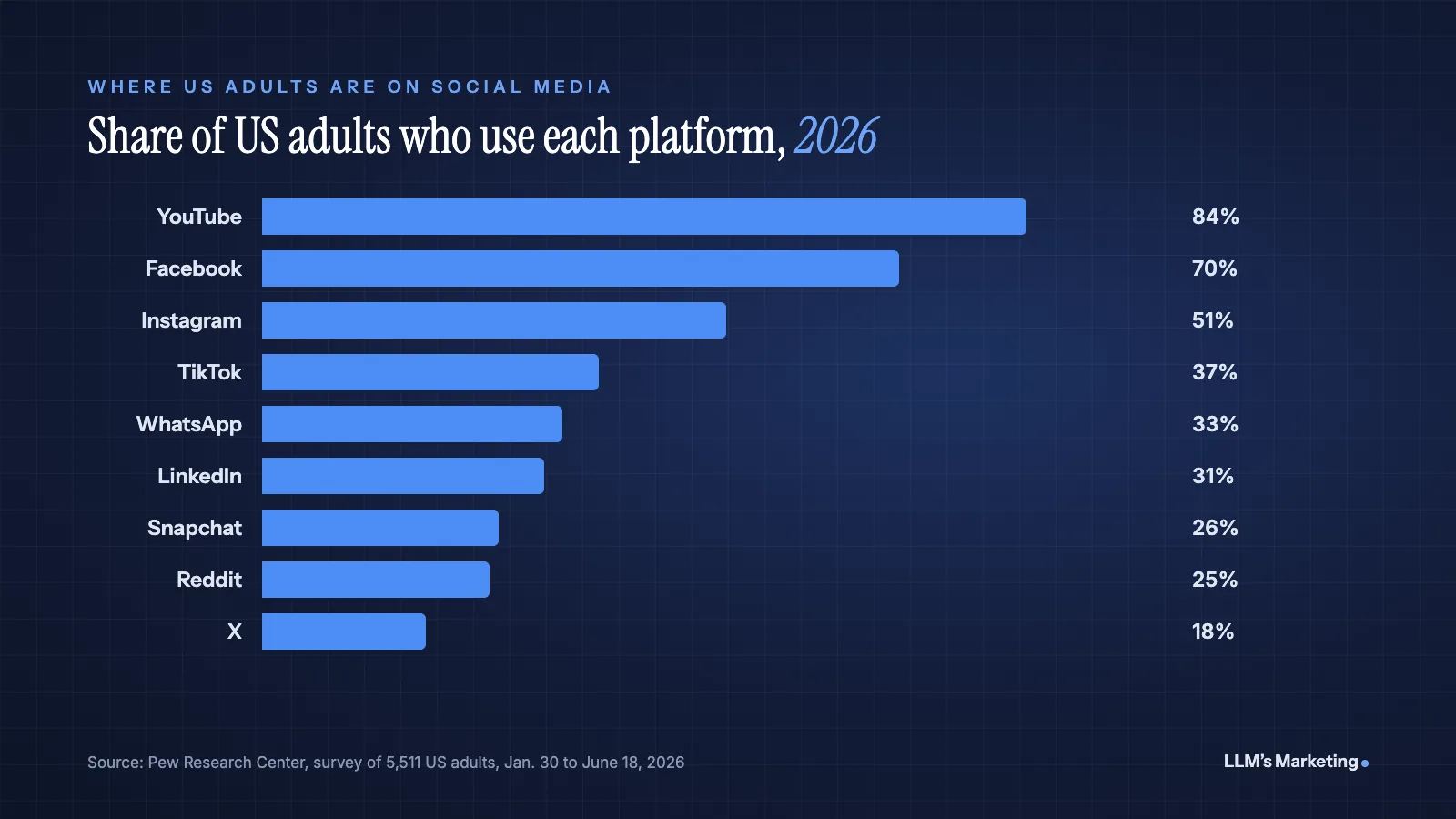
Age changes the picture sharply. In the same survey, 79% of adults ages 18 to 29 use Instagram, compared with 41% of those ages 50 to 64. A local service business selling to homeowners and a B2B software company selling to IT managers should not share a platform plan, and AI will not make that decision for you.
Search interest shows what most people want from AI here. In the Semrush US database (October 2026), "ai caption generator" draws about 5,400 searches a month, "ai social media post generator" about 1,300 and "ai social media manager" about 1,000. People are shopping for tools that produce posts. Tools are easy to buy; a clear strategy and a consistent voice are what competitors cannot copy.
Build a Brand Brief AI Can Follow
Generic output comes from generic input. Before you generate a single post, write a one-page brand brief and paste it at the start of every session (or save it as custom instructions or a project in ChatGPT, Claude or Gemini). Include:
- Who you serve: the two or three audiences you post for and what each one cares about.
- Voice: three adjectives, plus words and phrases you never use. Banned phrases matter more than adjectives, because they strip out the stock AI vocabulary.
- Proof points: real numbers, customer outcomes you are allowed to share, awards and credentials. AI cannot invent these safely, so give them to it.
- Platform rules: length, hashtag use, emoji policy and link placement for each network you use.
- Off-limits topics: pricing promises, health or legal claims, competitors by name, and anything your industry regulates.
- Three example posts that performed well and sound like you. Examples teach voice faster than any description.
A prompt built on the brief can be short: "Using the brand brief above, write three LinkedIn posts from this webinar transcript. Each under 150 words, one opinion per post, no hashtags, end with a question. Flag any claim that needs a source." The last instruction is the one most teams skip, and it is the one that saves them.
If you are deciding which assistant to standardize on, our guide to choosing the best LLM for business and marketing compares the main models for writing and analysis work.
A Weekly AI Social Media Workflow
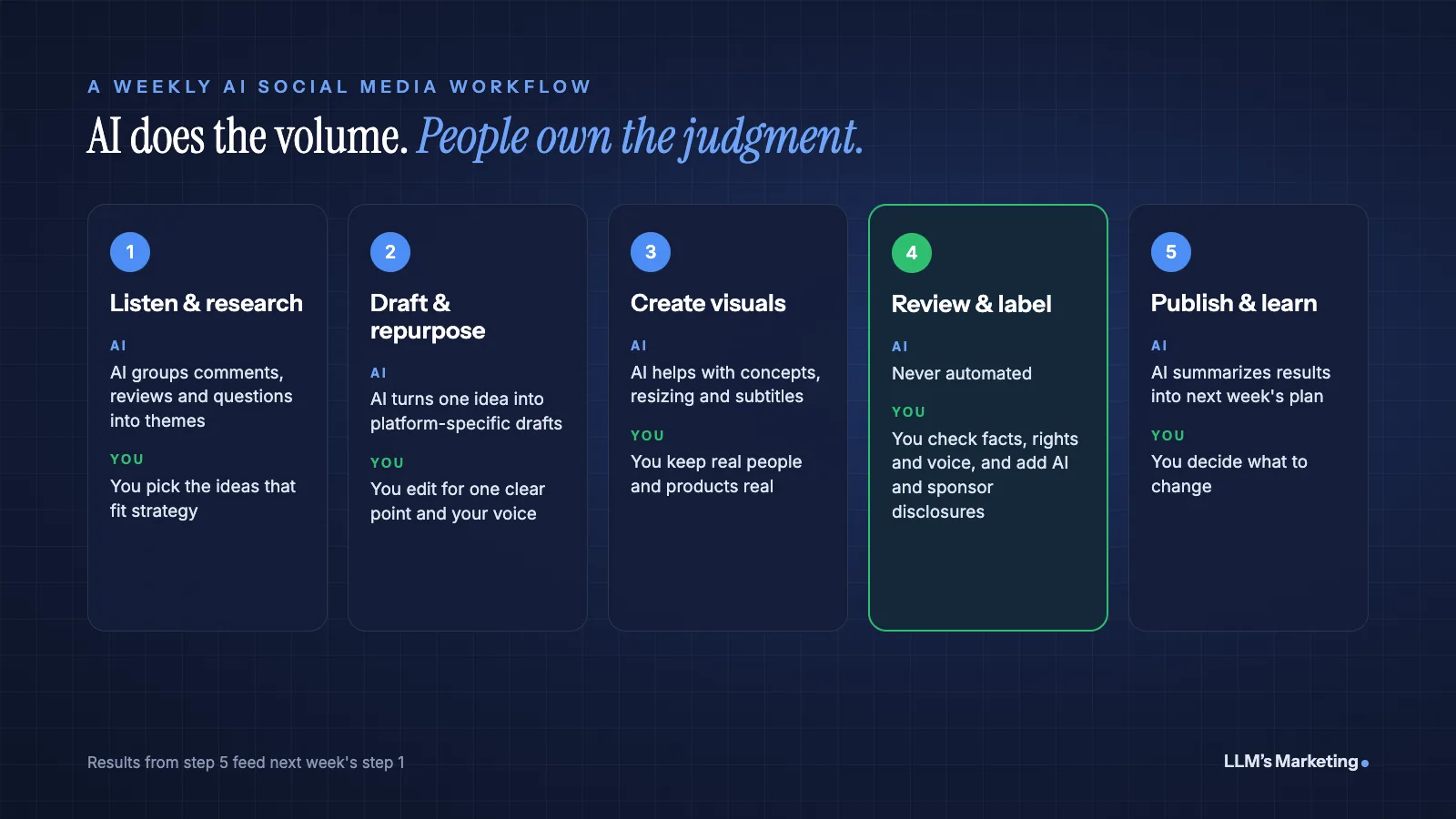
The workflow below fits a small team or a single marketer. It assumes you post a few times a week on two or three platforms and keeps a person at every step where content becomes public.
Step 1: Listen and research (Monday)
Export the past week's comments, direct messages, reviews and sales or support questions, remove personal details, and ask an AI assistant to group them into themes: recurring questions, objections, complaints and praise. Those themes are better post ideas than anything a tool will invent, because they come from your actual audience. Many social media management platforms also offer built-in listening and sentiment features that do this across mentions.
Step 2: Draft and repurpose (Tuesday)
Choose one strong source each week, such as a blog post, a customer story, a webinar or a founder's opinion, and have AI turn it into platform-specific drafts: a LinkedIn post, an Instagram carousel outline, a short video script and a few hook options. Write one opinion per post. AI drafts tend to hedge and list everything; your edit should cut to the single point a reader will remember. If you post as a creator, our guide to SEO for influencers shows how to make that content findable in Google, platform search and AI answers.
Step 3: Create visuals and video (Wednesday)
Use AI image and video tools for concepts, backgrounds, resizing for each format and auto-generated subtitles. Keep real people, real products and real locations real wherever the post makes a factual claim. A photo of your actual team or job site builds more trust than a flawless generated scene, and it avoids the labeling questions covered below.
Step 4: Review and label (Thursday)
A person reads every post before it is scheduled and checks four things: facts and numbers, brand voice, rights (music, images, people shown) and disclosure. If a post contains realistic AI-generated imagery, audio or video, apply the platform's AI label. If it involves a paid partnership, add a clear sponsorship disclosure.
Step 5: Publish and learn (Friday)
Schedule through your platform's native tools or a scheduler, then export last week's results and ask AI to summarize what worked: which topics, formats and hooks earned saves, shares, clicks and inquiries. Feed that summary into next Monday's research step. The loop is what turns AI from a content machine into a learning system.
Once this routine runs smoothly, some steps can move to AI agents that act across your tools. Our guide to AI agents for marketing covers where agents help on social and which guardrails to set first.
AI Disclosure Rules by Platform
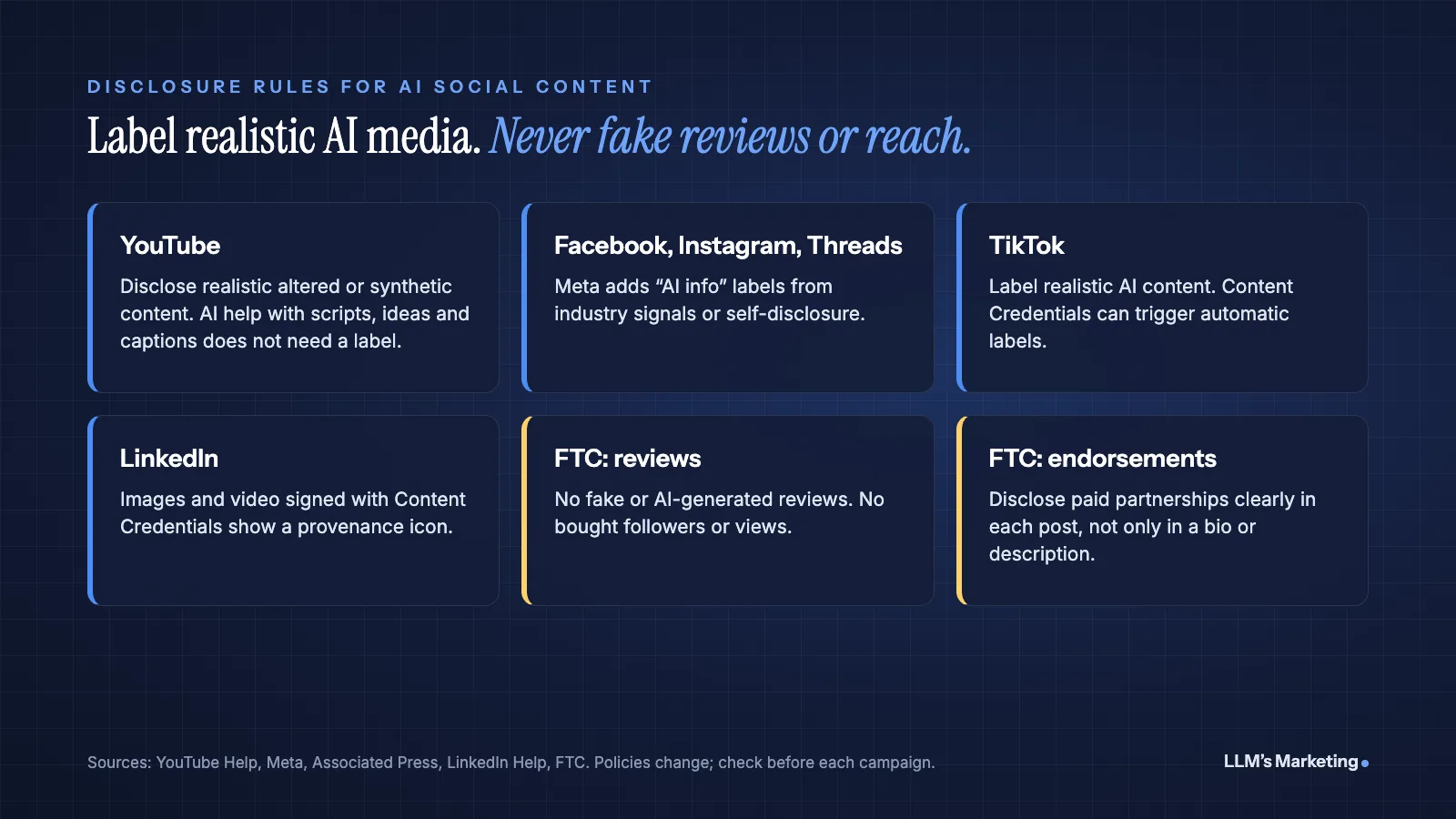
Every major platform now labels some AI-generated content, and several require creators to disclose it. The rules focus on realistic content that could mislead people. They generally do not cover using AI to write a script or a caption.
| Platform | What the rule says | What it means for a brand |
|---|---|---|
| YouTube | Creators must disclose realistic content that is AI-generated or meaningfully altered, such as making a real person appear to say something they did not, or showing a realistic scene that never happened. AI help with scripts, outlines, ideas and captions does not need disclosure (YouTube Help). | Use the "AI use" setting in YouTube Studio when it applies. YouTube says disclosing alone will not limit reach or monetization; repeated failure to disclose can lead to penalties. |
| Facebook, Instagram, Threads | Meta applies "AI info" labels when it detects industry-standard AI signals or when people self-disclose. Since September 2024, content only edited with AI shows the label in the post menu, while AI-generated content shows it on the post (Meta). | Expect generated images to be labeled. Advertisers must also disclose digitally created or altered political and social issue ads. |
| TikTok | TikTok requires creators to label realistic AI-generated content and began auto-labeling AI content made on other platforms that carries Content Credentials metadata (Associated Press, May 2024). | Turn on the AI-generated content label for realistic AI video, images or audio. |
| Images and video signed with C2PA Content Credentials show an icon that reveals whether AI was used, the app or device and who signed the credential. LinkedIn notes it cannot yet identify all AI content (LinkedIn Help). | Images from tools that embed credentials will carry the icon. Do not rely on it as your only disclosure. |
Policies change, so check each platform's help center before a campaign that leans on generated media. When in doubt, label. A disclosed AI image rarely hurts a brand; an undisclosed one that viewers spot themselves can.
FTC Rules That Apply to AI Social Content
For US businesses, two sets of FTC rules matter more than any platform policy, because they carry legal penalties.
Fake reviews and fake engagement
The FTC's final rule on consumer reviews and testimonials, announced August 14, 2024, bans reviews and testimonials that misrepresent who wrote them, explicitly including AI-generated fake reviews. It also bans buying or selling fake indicators of social media influence, such as followers or views generated by bots or hijacked accounts, when they are used to misrepresent influence for a commercial purpose (FTC). In practice: never use AI to write customer testimonials, never post "reviews" from personas, and never buy engagement.
Sponsored posts and influencers
The FTC's guidance on endorsements says disclosures belong in each post, should be hard to miss, and should not be buried among hashtags, hidden in comments or left only in a TikTok or YouTube description. Platform disclosure tools are no guarantee: the FTC says responsibility rests with the influencer and the brand, and recommends adding your own disclosure even when a platform offers a tool (FTC). If AI drafts captions for creators you pay, build the disclosure into the template so it is never forgotten.
This is general information, not legal advice. Regulated industries such as healthcare, finance and legal services have additional rules, and a compliance review is worth the time before scaling AI content.
What Not to Automate
- Public replies to complaints. AI can draft a response, but a person should send it. One tone-deaf automated reply can travel further than a month of posts.
- Crisis and breaking news. Pause scheduled posts during a crisis. Queued content that ignores current events looks careless.
- Testimonials, reviews and results. Real customers only, with permission. The FTC rule above makes this non-negotiable.
- Likenesses of real people. Do not generate realistic images, voices or videos of real people, including your own staff, without clear consent, and label them when the platform requires it.
- Claims you cannot source. Statistics, health claims, prices and guarantees need a human check against a real source every time. AI assistants can state invented figures with complete confidence.
- Customer data. Do not paste personal information from messages or your CRM into AI tools unless your agreement with the vendor and your privacy policy allow it.
How Social Media Supports Search and AI Visibility
Social content does more than earn likes. Videos, posts and community discussions about your brand are part of the public web that people search and that AI assistants draw on when they describe or recommend businesses. A YouTube explainer that answers a common customer question (see our video SEO guide), or a helpful founder post on LinkedIn, can keep working long after its first day in the feed. On X, this goes further: xAI's Grok can search public posts directly, as we explain in our guide to Grok SEO.
That makes consistency across channels important. Your name, services, locations and claims should match on your website, your social profiles and your business listings, so search engines and AI systems see one clear entity. Our guides on how to get your brand recommended by ChatGPT and what LLM marketing is explain how off-site presence feeds AI answers, and our State of AI Search and LLM Marketing 2026 report summarizes the research behind it.
How to Measure Whether AI Is Helping
Track three things for the first 90 days, and compare them with the 90 days before you started:
- Time per published post. From idea to scheduled. This is where AI should show the clearest gain.
- Outcomes per post, not volume. Saves, shares, comments, link clicks and inquiries. If you post twice as often but each post earns half as much, AI has made you busier, not better.
- Error rate. Posts that needed a correction, a deletion or a late label. This should stay at or near zero. If it rises, add a review step rather than more automation.
Use UTM tags on every link so social traffic and leads show up correctly in Google Analytics, and review the numbers monthly. If AI-assisted posts underperform your human-written ones on outcomes, the brief or the edit needs work, not the tool.
Common Mistakes to Avoid
- Publishing first drafts. Unedited AI copy is easy to spot: the same rhythms, the same hedges, the same stock phrases. Edit for one clear point and your own voice.
- Posting more instead of better. More output does not mean more reach. Spend the time AI saves on fewer, stronger posts and on replying to people.
- Skipping the labels. Realistic AI media without a disclosure can be labeled for you, reduced or removed, and it costs trust when viewers notice.
- Using one caption everywhere. LinkedIn, Instagram and TikTok reward different formats. Ask AI for platform-specific versions, then edit each.
- No brief. Without a brand brief, every session starts from zero and the output drifts toward the average of the internet.
Frequently Asked Questions
How can I use AI for social media?
Use AI to research audience questions, draft and repurpose posts for each platform, create and resize visuals, add subtitles, schedule content and summarize performance. Keep a person in charge of strategy, brand voice, fact-checking, public replies and final approval, and label realistic AI-generated media where platforms require it.
Do I have to label AI-generated social media posts?
For realistic AI-generated or altered images, video and audio, usually yes. YouTube and TikTok require creators to disclose realistic synthetic content, and Meta and LinkedIn label content that carries AI signals or Content Credentials. Using AI to help write a caption or script generally does not need a label, according to YouTube's policy.
Can AI replace a social media manager?
No. AI can take over much of the drafting, resizing, scheduling and reporting, which frees a social media manager to focus on strategy, creative direction, community management and judgment calls. Those are the parts of the job that determine whether a brand's social presence builds trust.
Is it legal to use AI to write reviews or testimonials?
Not as fake reviews. The FTC's 2024 rule bans reviews and testimonials that misrepresent who wrote them, including AI-generated fake reviews, and bans buying fake followers or views for commercial purposes. Testimonials should come from real customers with their permission.
What is the best AI tool for social media?
There is no single best tool. Most teams combine a general AI assistant such as ChatGPT, Claude or Gemini for research and drafting, a design tool with AI features for visuals, and a social media management platform for scheduling, listening and reporting. Choose based on the platforms you use, your team size and whether the tool fits your review process.
Where to Start
Write your brand brief this week, then run the five-step workflow for one month on your two most important platforms. Measure time per post, outcomes per post and errors, and keep a person in charge of review, replies and labels. Once the routine holds, automate the steps that are working, not the ones that are not.
If you would like help building the workflow, book a free call, reach us through the contact page or send your details below. Our founder, Mohd Adil Kazmi, will review your current setup and suggest where AI can save time without costing trust. You can also explore our marketing automation service, our AI SEO and content service or all services.
Where could AI save your team time on social, without costing trust?
Send your website and I'll review your Google Business Profile, service pages and AI visibility, then reply personally with the first fixes I would make.