
Every influencer eventually hits the same wall. A brand manager hears your name, types it into Google, and gets an old Twitter bio, a fan account and a two-year-old article that mentions you in passing. Meanwhile your best video from last spring has disappeared from everyone's feed. Social platforms are great at short bursts of reach. They are bad at keeping your work findable. SEO for influencers fixes that by making your name, your expertise and your best content show up when people actively search for them.
SEO for influencers (also called influencer SEO or creator SEO) is the work of making a creator easy to find through search: Google results for their name and topics, search inside YouTube, Instagram and TikTok, and answers from AI assistants such as ChatGPT, Gemini and Google AI Mode. It combines a creator-owned website, consistent profile information, search-friendly titles and captions, structured data and honest sponsorship disclosure.
This guide covers all four places where people search for creators, what decides visibility in each one according to the platforms' own documentation, and a practical order to work through it. It is written for influencers, creators and the managers who run their brands.
The Four Places People Search for Creators
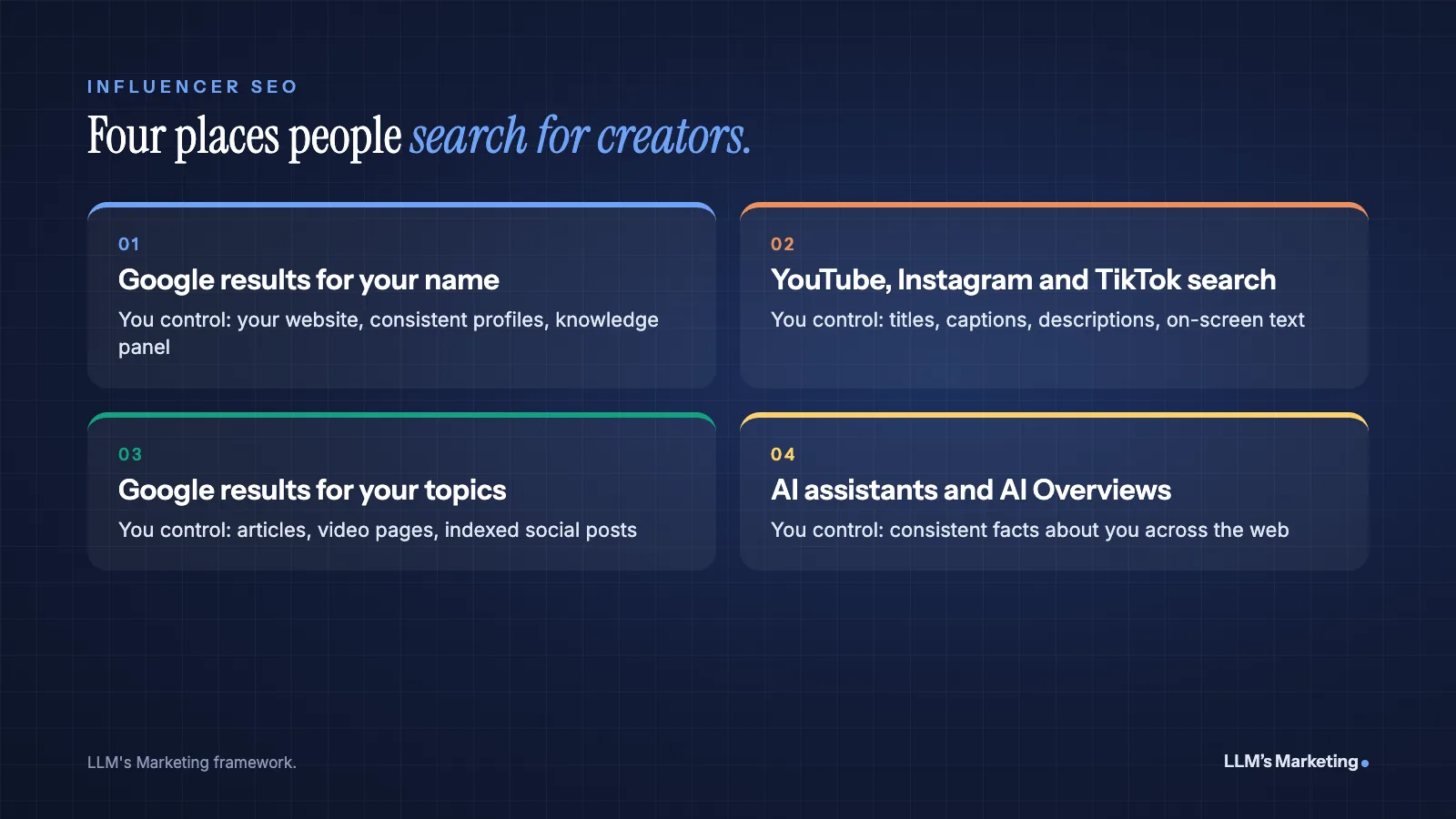
Most influencer SEO advice focuses on one surface, usually a website or Instagram captions. In practice your audience, brand partners and the press find you in four different places, and each works differently.
| Where people search | Who is searching | What you control most |
|---|---|---|
| Google results for your name | Brand partners, agencies, journalists, new fans | Your website, profile consistency, knowledge panel |
| Search inside YouTube, Instagram and TikTok | People looking for a topic, tutorial or review | Titles, captions, descriptions, on-screen text |
| Google results for your topics | People researching a question you have covered | Website articles, video pages, indexed social posts |
| AI assistants and AI Overviews | People asking "who is" or "best creators for" questions | Consistent facts about you across the web |
Why Search Matters for Creators Now
Two things make search more important for creators than it was a few years ago.
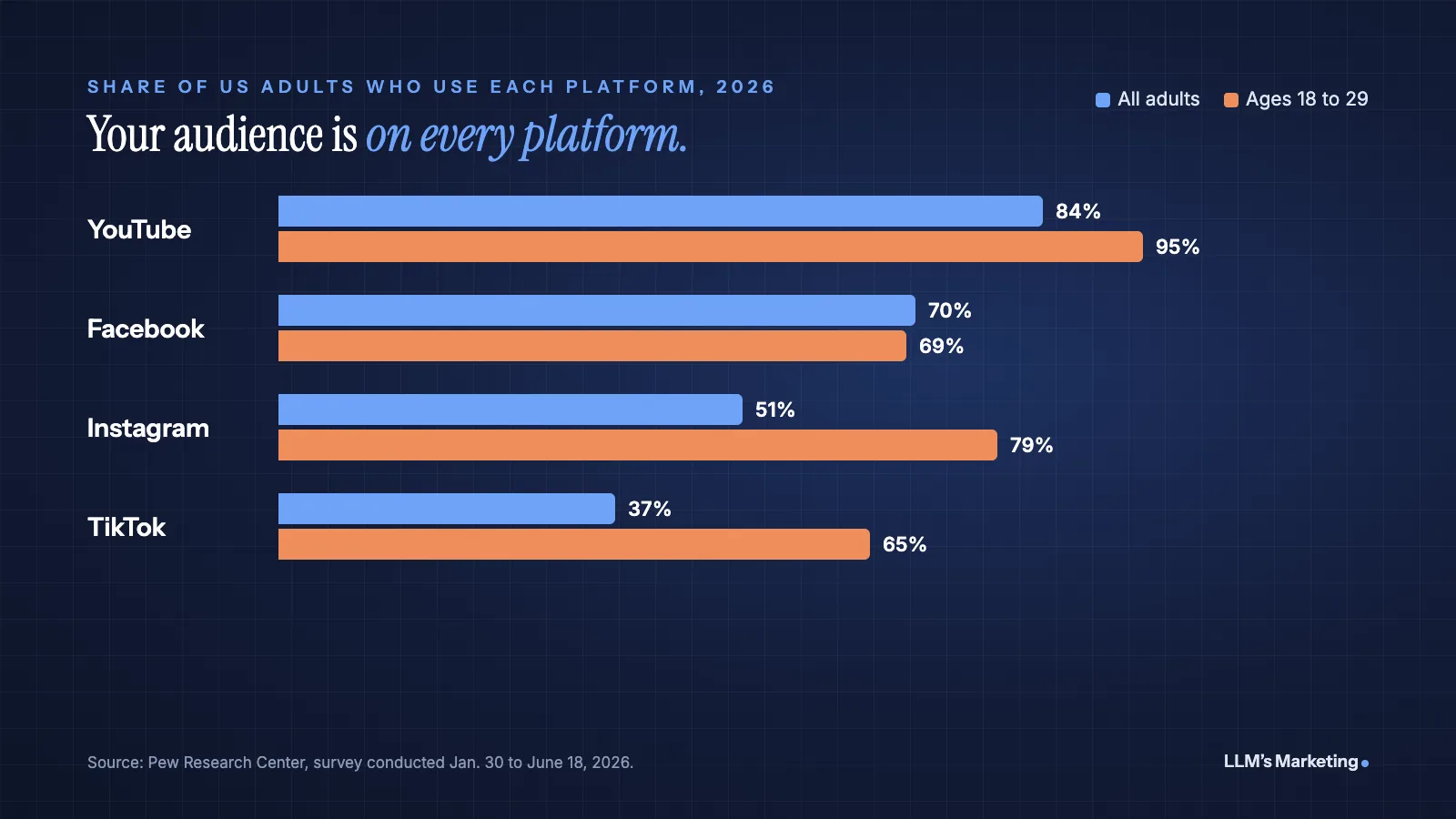
First, the audience is spread across platforms that all have search bars. Pew Research Center's 2026 survey of US adults found that 84% use YouTube, 51% use Instagram and 37% use TikTok. Among adults aged 18 to 29, the figures rise to 95%, 79% and 65% (Pew Research Center, October 2026). Creators are also a real source of information: Pew found that about one in five US adults, and 37% of adults under 30, regularly get news from influencers on social media (Pew Research Center).
Second, the line between social and search keeps blurring. Since July 10, 2025, public posts and reels from Instagram professional accounts (Creator and Business accounts held by users over 18) can be indexed by search engines such as Google (PPC Land). Your captions now affect whether a post can be found outside the app.
The search data shows how creators think about this. In the Semrush US database (November 2026), "influencer seo" gets about 880 searches a month, while platform-specific searches are far bigger:
| Search | Monthly US searches |
|---|---|
| youtube seo | 5,400 |
| instagram seo | 2,900 |
| linkedin seo | 2,400 |
| tiktok seo | 1,600 |
| influencer seo | 880 |
Creators look for help one platform at a time. That is understandable, but it misses the bigger opportunity: the platforms you post on and the website you own should reinforce each other, so the same facts and the same topics appear everywhere.
Step 1: Own the Search Results for Your Name
Start here, because it matters most for income. When a brand considers working with you, someone on its team will search your name. What they see shapes your rate before you ever talk.
Build a home base website
Social profiles rank for your name, but you do not control their layout, their rules or their future. A simple website on your own domain is the one result that is entirely yours. It does not need to be elaborate. Most creators need four pages:
- Home: who you are, what you make and who it is for, in plain words in the first lines
- About: your background, focus areas, notable collaborations and press, written in the third person as well as the first, so others can quote it
- Work with me or media kit: audience summary, formats you offer, past partners and a contact form
- Content hub: your best videos and articles organized by topic
Keep the site fast and mobile friendly, because most visitors will arrive from a phone. Our guide on how to SEO a website covers the technical basics step by step.
Make your identity consistent everywhere
Search engines and AI systems connect information about a person by matching names, photos, links and descriptions. If your YouTube channel says one thing, your Instagram bio another and your website a third, it is harder for them to be confident these all describe the same person.
Identity checklist
- Use the same name spelling and, where possible, the same handle on every platform
- Write one short bio sentence describing your niche and reuse it across profiles
- Link every social profile to your website, and link your website back to every profile
- Use the same profile photo, or at least a recognizably similar one
Add structured data to your About page
Structured data is code that describes your page in a format search engines read directly. For a creator's About page, Person markup with a sameAs list of your official profiles tells Google which accounts belong to you. Google also supports ProfilePage structured data, which it describes as designed for sites where creators share first-hand perspectives. Google's guidelines say the page's primary focus must be a single person or organization, and they list an "About Me" page on a blog as a valid example.
Markup does not guarantee a rich result, a knowledge panel or an AI mention. It removes ambiguity. Our guide to schema and entity optimization for LLMs explains what markup can and cannot do for AI visibility.
Claim your knowledge panel if you have one
A knowledge panel is the information box Google sometimes shows for well-known people. If one appears when you search your name, Google lets you claim it: search for yourself, choose "Claim this knowledge panel," then sign in to one of the official sites or profiles Google lists, such as YouTube or Search Console (Google Knowledge Panel Help). Once verified, you can suggest changes to it. Google notes that not all knowledge panels can be claimed yet. Panels are automatically generated from information across the web (Google), so consistent, accurate information about you is what the steps above help build.
Step 2: Optimize for Search Inside Each Platform
Each platform runs its own search engine. The principles are similar (describe your content clearly and accurately), but the details differ.
YouTube
YouTube says its search ranking prioritizes three elements: relevance, engagement and quality. For relevance, it looks at how well the title, tags, description and video content match the search. For engagement, it uses signals such as watch time for a particular query. For quality, it looks for channels that show expertise, authoritativeness and trustworthiness on a topic. YouTube also states that it does not accept payment for better placement in organic search (YouTube Help).
In practice, put the words people actually search in your title, and describe the video in the first lines of the description. YouTube's own tips point out that viewers see only the first few lines before clicking "more," so that part should explain the video (YouTube Help). Our full guide to video SEO for Google and YouTube covers titles, chapters, transcripts and thumbnails.
Instagram search and Google now both read your posts, provided your account is a public professional account. Write captions that say what the post is about in the first line, in the words someone would search ("easy high-protein breakfast," not just an emoji and a hashtag). Put your niche and location, if relevant, in your name field and bio. Use alt text on image posts to describe what is shown.
Check your privacy settings too. Indexing for eligible professional accounts is controlled by a search engine visibility setting, and a private or personal account will not have its posts indexed.
TikTok
Many people use TikTok search to look for recommendations, tutorials and reviews. Treat each video's caption and on-screen text as its description: state the topic clearly and use the phrases a viewer would type. Resist the temptation to pack captions or tiny on-screen text with unrelated keywords. It makes videos harder to trust, and platforms treat that kind of stuffing as spam. A clear spoken hook that names the topic helps viewers, and it is the kind of relevance every platform's search is built to reward.
LinkedIn for business creators
If your audience is professional, your LinkedIn headline and About section work like a title tag and meta description. Name your specialty in plain language, keep it consistent with your website and publish longer posts or articles on the topics you want to be known for.
Step 3: Turn Your Best Content Into Pages That Rank
Your back catalog is an SEO asset. Videos and posts that answered a real question once will keep answering it, if they live somewhere search engines can find and understand them.
- Give top videos their own page. Embed the video on your website with a written summary, key points and a transcript. Google's video SEO best practices recommend a dedicated watch page and structured data so Google can find and understand the video.
- Group content by topic. A "Skin care routines" or "Budget travel in Europe" hub that links to every related video and article shows depth on a subject.
- Answer the questions your comments ask. Repeated questions in your comments and DMs are free keyword research. Each one can become a short article or a pinned video.
- Write from experience. Google's guidance on helpful content asks creators to consider "Who, How and Why": who created the content, how it was made and why it exists (Google Search Central). Creators have an advantage here, because first-hand testing and real experience are exactly what generic content lacks.
AI tools can speed up transcripts, summaries and first drafts, but edit them in your own voice. Our guide on how to use AI for social media covers where AI helps and where it makes content sound generic.
Step 4: Show Up When People Ask AI About You
People now ask ChatGPT, Gemini, Perplexity and Google AI Mode questions such as "who are the best fitness creators for beginners" or "who is [your name]." These assistants build answers from information they find across the web, so the same groundwork helps here.
Google is direct about this. In its guide to generative AI features, Google says AI Overviews and AI Mode are rooted in its core Search ranking and quality systems, and that from Google Search's perspective, optimizing for generative AI search "is optimizing for the search experience, and thus still SEO" (Google Search Central).
For creators, that means:
- Keep the facts about you consistent: name, niche, location if relevant, notable work
- Publish a clear About page that states those facts in plain sentences an AI system can quote
- Earn mentions on other sites, such as interviews, podcast pages, press coverage and collaborations, since independent sources carry more weight than your own claims
- Ask the major assistants about yourself every month, and correct inaccurate information at its source
No tactic guarantees that an AI assistant will mention you. Our step-by-step guide on how to get recommended by ChatGPT explains what influences those answers, and the same principles apply to personal brands.
Step 5: Monetize Without Hurting Trust or Rankings
Sponsored posts and affiliate links are how most creators earn money. Handled carelessly, they create both legal and search problems.
Disclose sponsorships the way the FTC expects
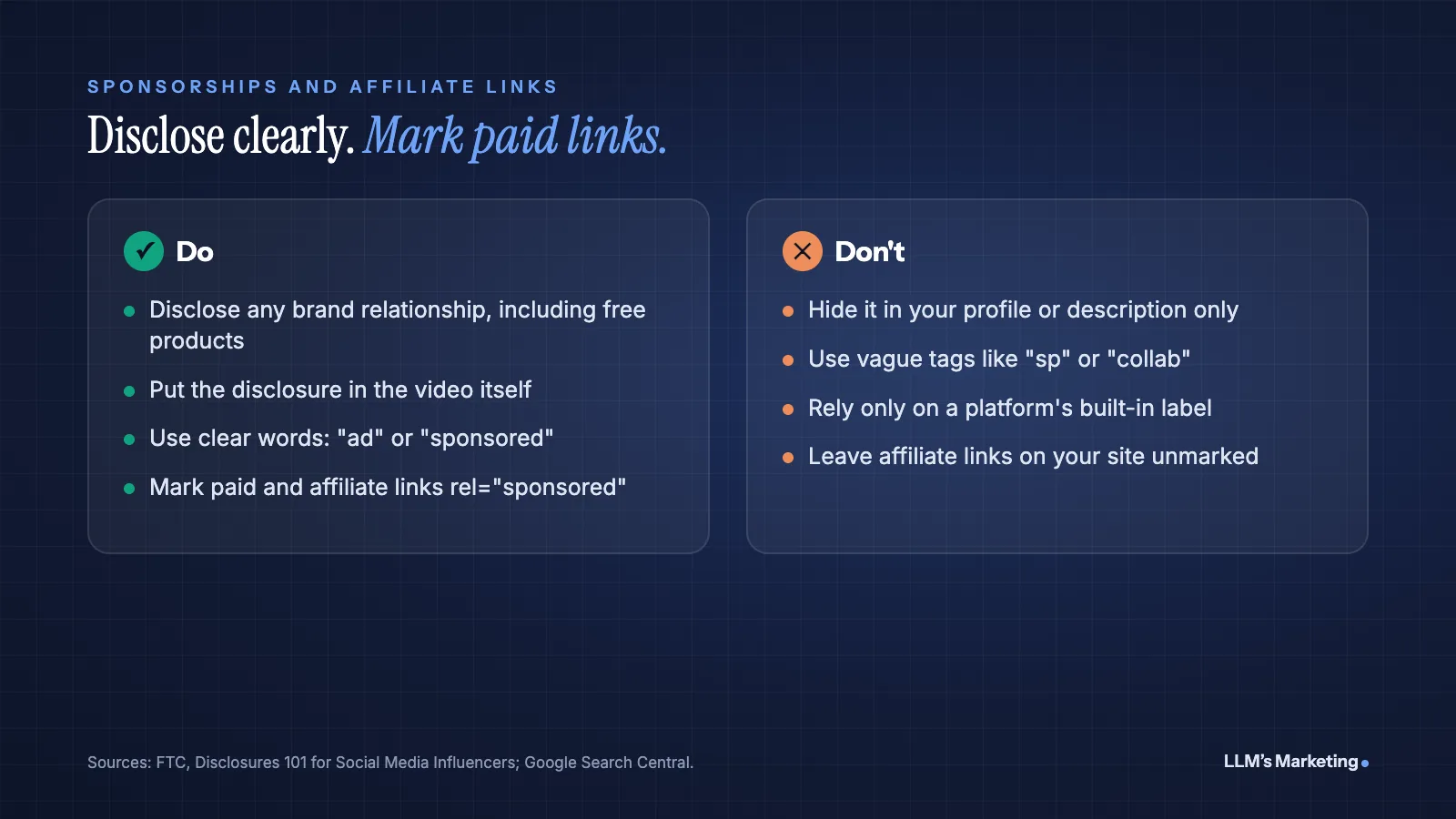
The Federal Trade Commission's guide for influencers says you should disclose any financial, employment, personal or family relationship with a brand, including free or discounted products. Disclosures should be hard to miss and placed with the endorsement. In videos, the disclosure should be in the video itself, not only in the description. Terms such as "ad," "advertisement" or "sponsored" work, while vague ones such as "sp," "spon" or "collab" do not (FTC, Disclosures 101 for Social Media Influencers). This is not legal advice, but it is the baseline every US creator should follow.
Mark paid and affiliate links on your website
Google asks site owners to mark links that are advertisements or paid placements with rel="sponsored" (Google Search Central). Affiliate links in your gear guides and sponsored mentions in your blog posts fall into this category. Marking them protects your site and tells readers which recommendations are paid.
How to Measure Influencer SEO
Search results build slowly, so track a few numbers monthly rather than checking daily.
- Branded searches: in Google Search Console, how many clicks and impressions come from searches that include your name
- Search-driven views: the share of views that come from search in YouTube Analytics and in your Instagram and TikTok insights
- What page one shows: a monthly private-window search of your name, noting what ranks and what is outdated
- AI answers: what ChatGPT, Gemini, Perplexity and Google AI Mode say about you and your niche
- Inquiries: brand partnership requests that arrive through your website
Common Influencer SEO Mistakes
- Relying on a link-in-bio page alone. It helps followers, but it gives search engines very little to understand about you.
- Captions written only for the feed. An inside joke or a single emoji tells search nothing about the post.
- Different names and bios everywhere. Inconsistency makes it harder for Google and AI systems to connect your profiles.
- Keyword stuffing. Lists of hashtags or unrelated keywords hurt credibility with viewers and with platforms.
- Unmarked sponsorships. Hidden paid relationships break FTC guidance and can damage trust faster than any ranking can recover.
Frequently Asked Questions
Do influencers need a website for SEO?
Not strictly, but it helps a great deal. Social profiles can rank for your name, yet you do not control them. A simple website with About, media kit and content pages gives Google and AI assistants one authoritative source of facts about you, and gives brand partners a professional place to contact you.
Can Instagram posts rank on Google?
Yes, for eligible accounts. Since July 10, 2025, public posts and reels from Instagram professional accounts held by users over 18 can be indexed by search engines such as Google. Private and personal accounts are not included, and creators can turn indexing off in their privacy settings.
How do I get a Google knowledge panel?
You cannot simply request one. Google says knowledge panels are generated automatically from information across the web. If a panel already appears for your name, you can claim it by choosing "Claim this knowledge panel" and signing in to an official profile such as YouTube. Consistent profiles, a clear About page and independent coverage make a panel more likely over time.
What is the difference between influencer SEO and influencer marketing?
Influencer SEO helps a creator get found through search engines, platform search and AI assistants. Influencer marketing is a brand paying or partnering with creators to reach their audience. Brands sometimes use "influencer SEO" to describe creator content that also earns mentions and links for the brand, but for creators it usually means their own discoverability.
How long does influencer SEO take to work?
Platform search can respond within days of a well-titled upload. Google results for your name and topics usually take several months, especially for a new website. AI answers change as the information about you across the web changes, so expect gradual improvement rather than an overnight switch.
Where to Start
If you do three things this month, make them these: search your name in a private window and note what appears, make your bio and links consistent on every platform, and publish a simple website with a clear About page. Then rewrite the titles and descriptions of your ten most-watched videos so they say what each video is about.
If you want help, our AI search visibility service works on how creators and brands appear in Google and AI answers, and our AI SEO and content team builds websites and content hubs that rank. You can also book a free call to talk through your situation.
What do brands see when they Google your name?
Send your website and I'll review what Google, YouTube and AI assistants show for your name and niche, then reply personally with the first fixes I would make.