

Most "how to SEO a website" guides hand you a list of 50 tactics with no order and no way to tell which ones matter. The result is busywork: tweaking meta keywords Google ignores while the pages that could bring in customers never get written. This guide does the opposite. It gives you ten steps in the order that pays off, grounded in what Google's own documentation says, and updated for a search world where AI answers sit above the links.
To SEO a website, make sure search engines can crawl and index it, research the words your audience uses to search, organize the site so each important topic has one clear page, optimize titles, headings and content on each page, keep the site fast and mobile friendly, earn links and mentions from relevant sites, and measure results in Google Search Console. The same foundations help your pages appear in AI answers from Google, ChatGPT and other assistants.
SEO, or search engine optimization, is the work of helping search engines understand your content and helping people find it. Google says changes can take effect in a few hours or take several months, so expect steady progress rather than overnight results (Google SEO Starter Guide).
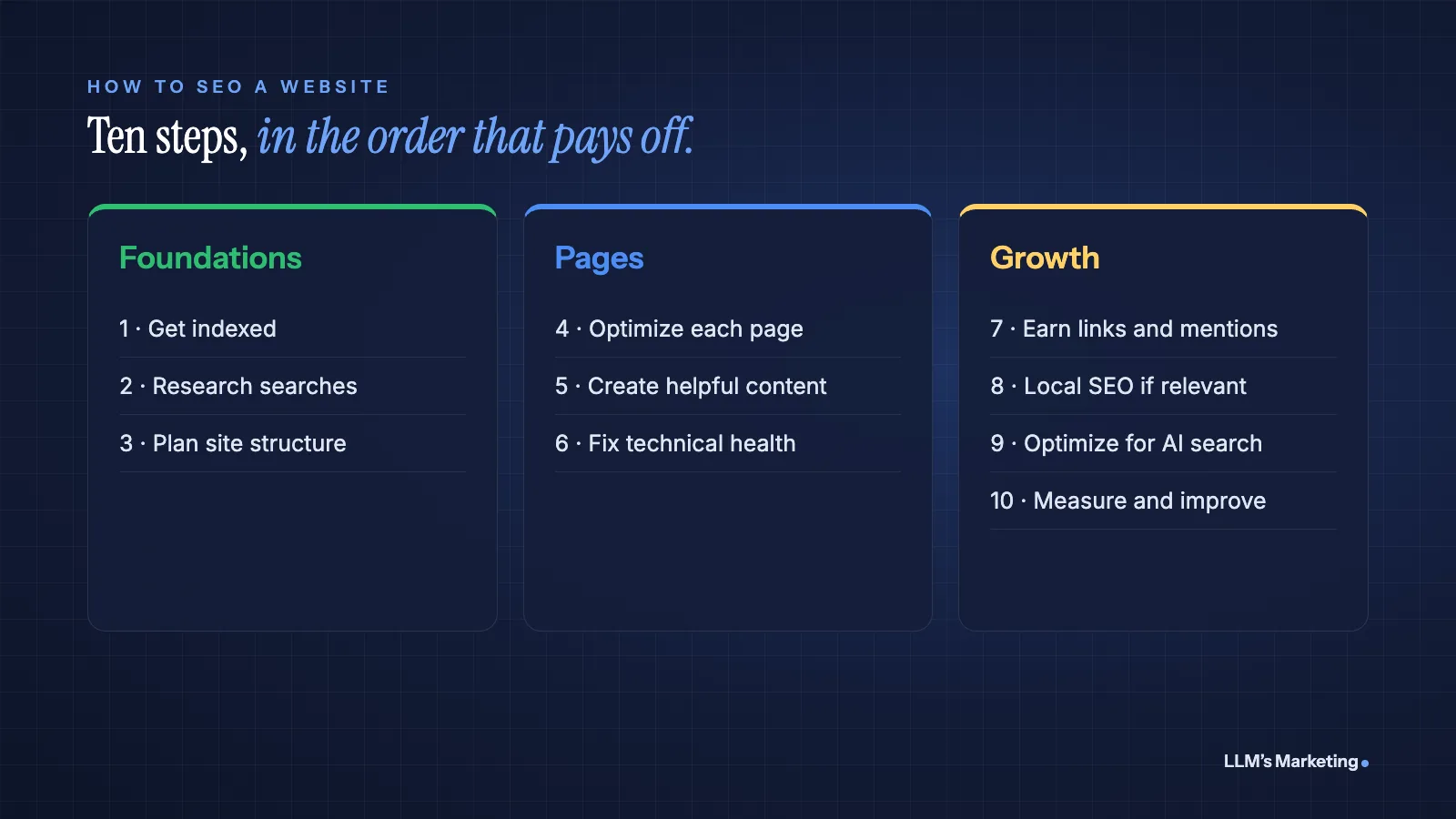
Step 1: Make Sure Google Can Find and Index Your Site
Nothing else matters if Google cannot see your pages. Google lists three minimum technical requirements: Googlebot is not blocked, the page works (returns an HTTP 200 status code) and the page has indexable content. Google also notes that meeting them does not guarantee indexing (Google).
- Check the index. Search Google for
site:yourdomain.com. If your pages appear, you are in the index. - Set up Google Search Console. It is free and shows which pages are indexed, which have problems and which searches bring visitors. Use the URL Inspection tool to check individual pages.
- Submit an XML sitemap. A sitemap lists the pages you want indexed. Most website platforms create one automatically; submit its URL in Search Console.
- Check robots.txt and noindex tags. Make sure you are not blocking pages you want in search, a common leftover from a site that was built on a staging server.
Step 2: Research What Your Audience Searches
Google advises using "words that people would use to look for your content" and placing them in prominent spots such as titles and headings (Google Search Essentials). Keyword research is how you find those words.
- Start with your customers. List the questions they ask your sales and support teams, the problems they describe and the words they use for your products. These are often better keywords than anything a tool suggests.
- Expand with tools. Search Console's Performance report shows searches you already appear for. Google's autocomplete and "People also ask" boxes show related questions. Keyword tools add estimated search volume and difficulty.
- Sort by intent. Someone searching "what is a heat pump" wants to learn; someone searching "heat pump installation near me" wants to hire. Each needs a different kind of page.
- Pick one main topic per page. Two pages targeting the same search compete with each other. Combine them or give each a distinct purpose.
Step 3: Plan Your Site Structure and Internal Links
A clear structure helps both visitors and search engines understand what matters on your site. Group pages into logical sections (services, locations, guides) and link related pages together.
- Use crawlable links. Google can generally only follow links that are
<a>elements with anhrefattribute, and every page you want found should be linked from at least one other page on your site (Google). - Write descriptive anchor text. Google recommends link text that is "descriptive, reasonably concise, and relevant," not "click here."
- Build hub pages. A main page for each topic that links to its detailed subpages, and back again, makes your expertise on that topic easy to see.
- Use readable URLs. Google's Starter Guide recommends URLs with words that help people understand the page, such as
/services/roof-repair/rather than a string of numbers.
Step 4: Optimize Each Page
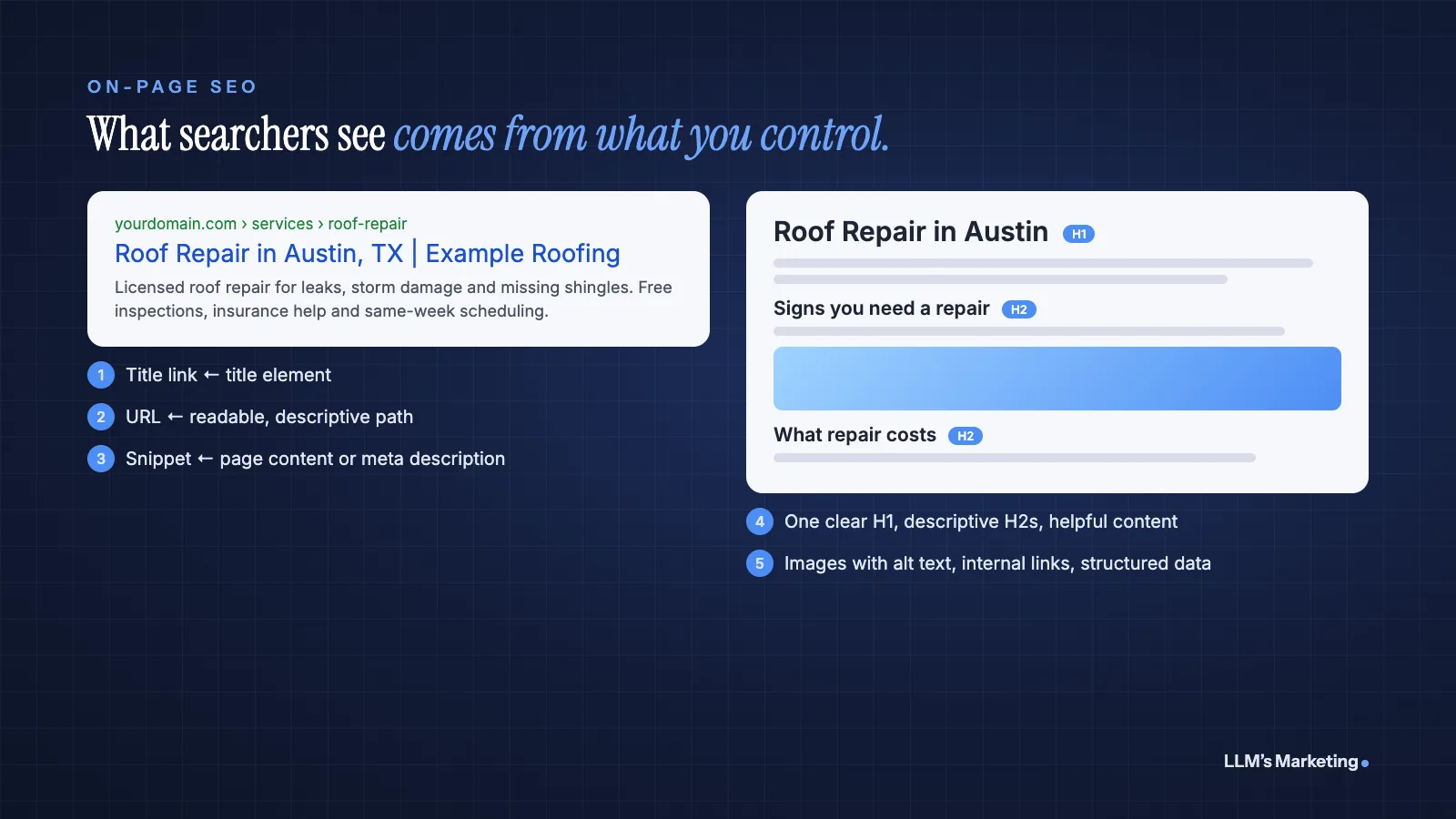
On-page SEO means making each page clear about what it covers. These are the elements that matter most:
| Element | What to do |
|---|---|
| Title element | Unique to each page, clear, concise and accurate. Google's Starter Guide says a good title "accurately describes the contents of the page." Put the main topic near the start. |
| Meta description | Short, unique and focused on the most relevant points of the page. Google often builds the snippet from page content instead, but a good description gives it a strong option. |
| Headings | One H1 that states the page's topic, then H2 and H3 headings that outline the content in plain language. |
| Body content | Answer the searcher's question early, then go deeper. Use the words your audience uses naturally; Google treats excessive keyword repetition as spam. |
| Images | Descriptive file names and alt text that explain the image's relationship to the content. For video, see our video SEO guide. |
| Structured data | Schema markup (for example Organization, LocalBusiness, Product, Article or FAQ) helps search engines understand the page and can make it eligible for rich results. It must match visible content. |
Two things you can skip: Google does not use the meta keywords tag, and there is no ideal word count; length alone does not affect rankings (Google SEO Starter Guide). For structured data in depth, see our guide to schema and entity optimization.
Step 5: Create Helpful Content
Google's ranking systems aim to reward helpful, reliable, people-first content: content created to help people rather than to manipulate rankings. In practice that means:
- Show first-hand experience. Real examples, photos, data, results and opinions from people who have done the work.
- Be complete. Cover what a reader needs to act, including costs, steps, risks and alternatives, so they do not need to go back to the results.
- Make authorship clear. Say who wrote or reviewed the content and why they are qualified. Google says E-E-A-T (experience, expertise, authoritativeness and trust) is not itself a ranking factor, but the signals behind it help readers trust you.
- Keep it current. Update pages when facts, prices or rules change, and show the date of the last meaningful update.
Step 6: Fix Technical Health and Page Experience
Google uses the mobile version of a site's content, crawled with its smartphone agent, for indexing and ranking, so your mobile pages should carry the same primary content, headings, structured data and meta tags as desktop (Google).
Speed and stability matter too. Google's Core Web Vitals measure loading, responsiveness and visual stability. To be rated "good," a page should meet all three targets at the 75th percentile of page loads (web.dev):
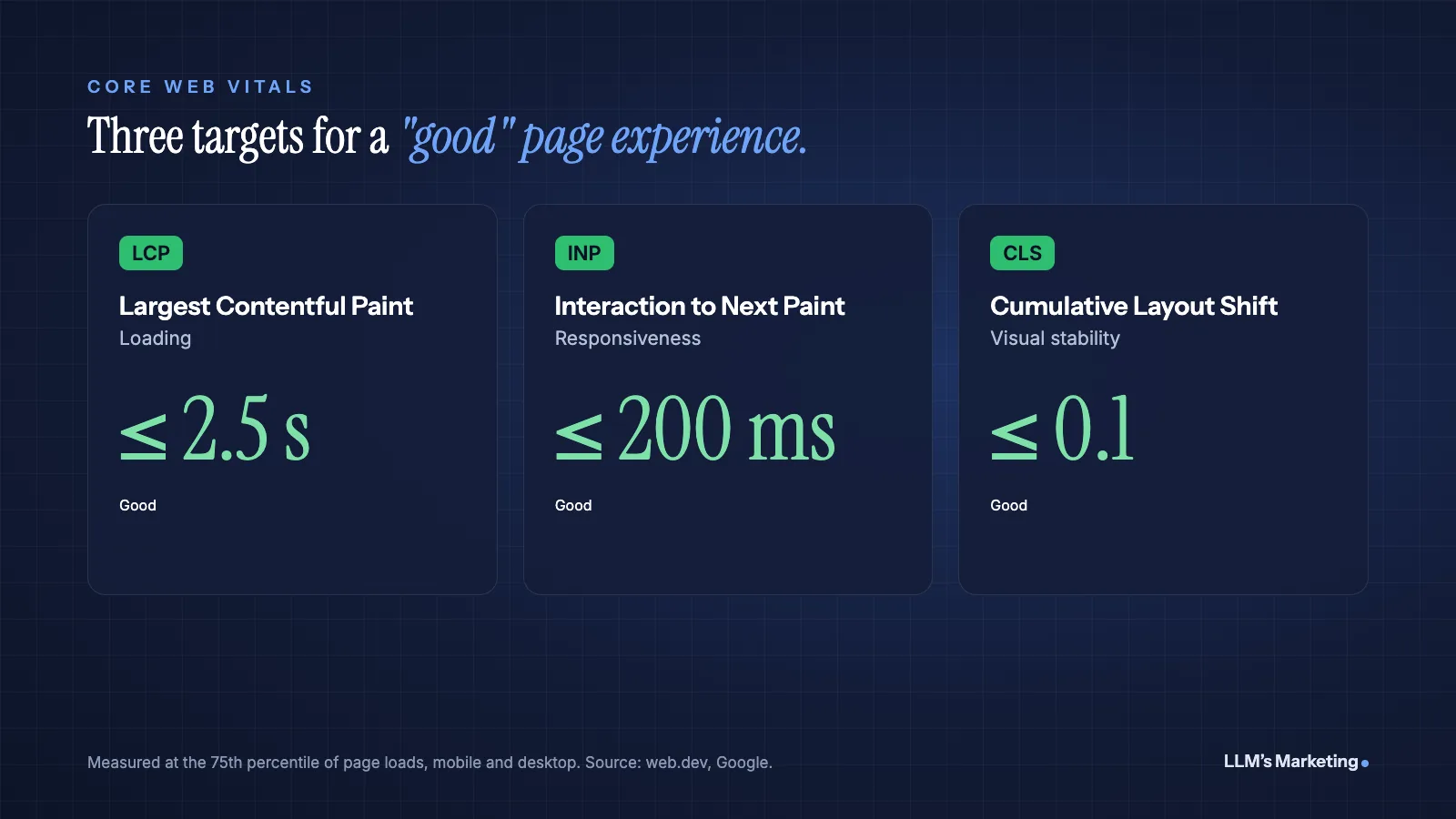
- Largest Contentful Paint (LCP): 2.5 seconds or less.
- Interaction to Next Paint (INP): 200 milliseconds or less.
- Cumulative Layout Shift (CLS): 0.1 or less.
Check them in Search Console's Core Web Vitals report or PageSpeed Insights, and see our guide to advanced Core Web Vitals for diagnosing and fixing each metric. Other technical basics: serve the site over HTTPS, fix broken links and redirect chains, and use redirects or canonical tags for duplicate pages. Google says duplicate content is not a spam violation, but it can waste crawling resources.
Step 7: Earn Links and Mentions
Links from other relevant websites remain one of the ways search engines discover pages and judge their importance. Google's own advice is simple: "tell people about your site" and promote it in communities where it is relevant (Google Search Essentials).
- Publish original data, tools or guides that others want to reference.
- Get listed in reputable industry and local directories, associations and partner pages.
- Contribute expert commentary to journalists and industry publications.
- Build relationships with complementary businesses that serve the same audience.
Avoid buying links or joining link exchanges built to manipulate rankings. Google's spam policies treat link schemes as a violation that can lower rankings or remove pages from results. Be equally wary of "free blog upload" and guest post sites: our UploadBlog.com review shows how to check whether a site's links are worth anything before you pitch it.
Step 8: Add Local SEO If You Serve a Local Area
If customers visit you, or you travel to them, local SEO decides whether you appear in the map pack. Google says local results are based mainly on relevance, distance and prominence. Claim and complete your Google Business Profile, keep your name, address and phone number consistent everywhere, collect genuine reviews and create a page for each service and area you genuinely serve. Our industry guides show how this works for specific businesses, and our guide to local SEO for ecommerce covers online stores.
Step 9: Optimize for AI Search
Search now often starts with an AI answer. In a Pew Research Center study of 900 US adults' browsing in March 2025, users clicked a traditional search result in 8% of visits to Google results pages that included an AI summary, compared with 15% when there was no summary, and clicked a link inside the summary in about 1% of visits (Pew Research Center).
Google says there are no special requirements to appear in AI Overviews or AI Mode beyond the fundamentals in this guide. To improve your chances of being cited by AI assistants:
- Answer common questions directly in clear, self-contained passages.
- State key facts about your business consistently on your site and across the web.
- Earn mentions on the review sites, publications and communities AI systems draw from.
- Test the prompts your buyers use in ChatGPT, Gemini, Perplexity and Grok, and fix gaps.
Our guides to GEO vs SEO, getting recommended by ChatGPT and Grok SEO go deeper, and our State of AI Search and LLM Marketing 2026 report summarizes the research.
Step 10: Measure and Improve
SEO is a cycle, not a project. Review these monthly:
- Search Console Performance: impressions, clicks, average position and click-through rate by page and query. Pages with many impressions but few clicks often need better titles.
- Indexing reports: pages excluded from the index and why.
- Conversions: leads, calls, sales or sign-ups from organic search in your analytics. Rankings matter only if they bring business.
- AI visibility: whether AI assistants mention you for your key topics.
Then act on what you find: improve pages that rank on page two, update outdated content, merge pages that compete with each other and build new pages for questions you do not yet answer.
Common SEO Mistakes to Avoid
- Blocking search engines by accident. A leftover noindex tag or robots.txt rule can hide an entire site.
- Keyword stuffing. Google treats excessive repetition as spam, and readers find it tiring.
- Several pages for the same search. They split signals and compete with each other.
- Writing for word count. Length is not a ranking factor. Completeness and usefulness are what count.
- Buying links. It breaks Google's spam policies and can backfire badly.
- Judging too early. Many changes take weeks or months to show results.
Frequently Asked Questions
How do I SEO my website for free?
Most core SEO work is free: set up Google Search Console, submit a sitemap, research what your customers search, write clear titles and helpful pages, link related pages together, keep the site fast and mobile friendly, and claim your Google Business Profile if you serve a local area. Paid tools and services mainly save time and add data.
How long does it take for SEO to work?
Google says some changes take effect in a few hours and others take several months. New sites and competitive topics usually take longer. Measure progress in Search Console over weeks and months rather than days.
What are the most important SEO factors?
Google does not publish a ranked list, but its documentation stresses crawlable, indexable pages, helpful people-first content, the words people actually search for in titles and headings, crawlable internal links, a good mobile experience and links or mentions from relevant sites.
Do I need a blog for SEO?
Not necessarily. You need pages that answer the questions your customers search. For many businesses, strong service, product and location pages matter more than a blog. A blog helps when your audience researches problems before buying.
Is SEO still worth it with AI search?
Yes. AI answers reduce some clicks, but Google says its AI features rely on the same fundamentals as regular search, and other AI assistants draw on content they find on the web. Strong SEO is the foundation for being cited in AI answers as well as ranking in traditional results.
Where to Start
Start with Step 1 today: run a site: search and set up Search Console. Then list the 10 questions your customers ask most, check whether you have a clear page for each, and improve or create those pages first. Revisit this guide's steps every quarter.
If you would like a second opinion, book a free call, reach us through the contact page or send your details below. Our founder, Mohd Adil Kazmi, will review your site's indexing, pages and AI visibility and reply with the first fixes worth making. You can also explore our AI SEO and content service, our AI search visibility service or all services.
Not sure which SEO fixes to make first?
Send your website and I'll review your Google Business Profile, service pages and AI visibility, then reply personally with the first fixes I would make.