
Until this week, no business could see its own ChatGPT performance from OpenAI's side. You could test prompts by hand, pay for a third-party tracker or dig through referral traffic in Google Analytics, but OpenAI itself shared nothing. On November 10, 2026, that changed. OpenAI launched Businesses in ChatGPT in beta, and with it ChatGPT Business Hub: a place to claim your business, correct what ChatGPT says about it and see how often it is mentioned and clicked.
ChatGPT Business Hub is OpenAI's free, beta dashboard for businesses that appear in ChatGPT. After you claim and verify your business, it lets you manage your business information and products, see the number of mentions and website clicks your business receives in ChatGPT over a 28-day window, explore "discovery topics" (common themes in conversations that cite your website) and, for eligible US ecommerce and online service businesses, publish a Business Agent that answers customer questions.
What Is ChatGPT Business Hub?
Business Hub is the management side of a wider OpenAI program called Businesses in ChatGPT. In OpenAI's words, quoted by Search Engine Roundtable, the program gives businesses "a new way to connect with the 1.2 billion people who use ChatGPT each week," where "businesses can claim their business, manage their information, and see insights on how people engage with them on ChatGPT."
It did not arrive out of nowhere. On November 6, 2026, Search Engine Roundtable's Barry Schwartz reported that OpenAI was building a tool similar to Google Search Console or Bing Webmaster Tools. The report cited ecommerce analyst Juozas Kaziukėnas, who had seen an early banner inviting businesses to "Claim your business in ChatGPT" and an analytics view that tracked mentions and clicks. Four days later, it launched.
Business Hub has three parts:
| Part | What it does | Who can use it |
|---|---|---|
| Business profile | Claim your listing, keep business information current and add products, including through a product feed or a Shopify connection | Eligible businesses in markets where ChatGPT operates and OpenAI supports verification; local stores and restaurants can claim an existing US listing |
| Insights | Mentions, website clicks and discovery topics over 28 days | Verified businesses, once minimum data thresholds are met |
| Business Agent | An AI agent that answers customer questions using the information the business supplies | Eligible US ecommerce and online service businesses with a website |
One naming warning: Business Hub has nothing to do with ChatGPT Business, OpenAI's paid workplace subscription for teams. According to VentureBeat, you do not need a ChatGPT Enterprise agreement or an ads account to claim a profile.
What Business Hub Insights Actually Show
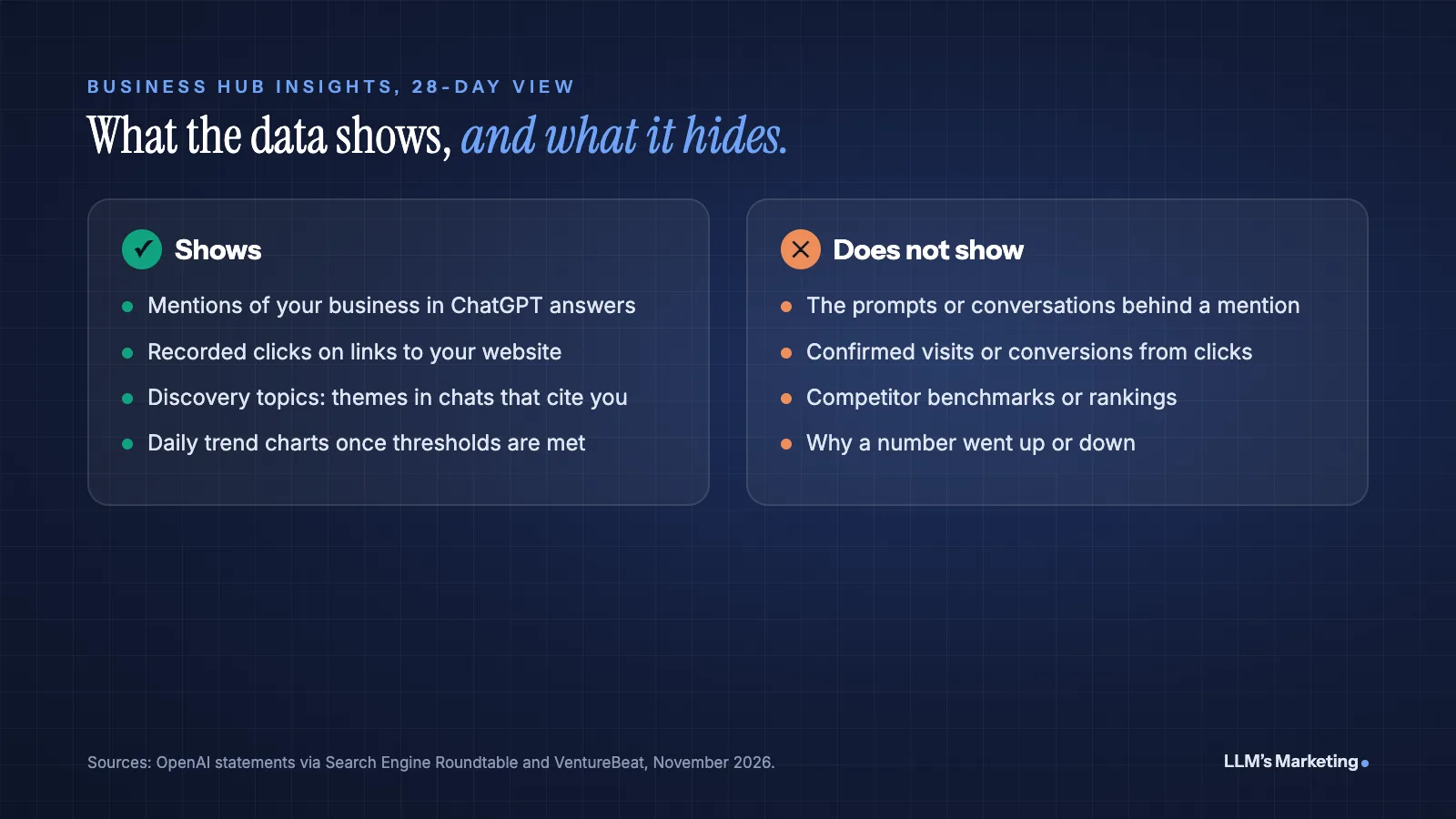
The insights are the reason marketers are paying attention. They are the first first-party numbers OpenAI has given businesses about their visibility in ChatGPT. OpenAI describes them as the "number of mentions and website clicks a business receives," plus discovery topics, which it calls "common themes across conversations where their website is cited."
| Metric | How OpenAI defines it | What it does not tell you |
|---|---|---|
| Mentions | For online businesses, a mention counts only when ChatGPT references your website. For local businesses, it counts when your location appears in a result. | Your brand name alone in an answer, with no website reference, does not count for online businesses. |
| Website clicks | "Number of recorded clicks on links to your website in ChatGPT." | OpenAI's own tooltip says "Clicks don't confirm website visits or conversions." |
| Discovery topics | Common themes across conversations where your website is cited. | The individual prompts or conversations behind those themes. |
Three limits matter when you read these numbers. First, all figures are 28-day aggregates, and VentureBeat reports that metrics appear only after minimum thresholds are met, so a blank metric may mean data is still being collected rather than zero. Second, OpenAI says plainly, "We don't share users' conversations or Business Agent chats with businesses." Third, there is no competitor benchmark. Kaziukėnas noted before launch that the tool shows no prompt data or rankings, so "it won't help understanding why mentions/clicks are increasing or decreasing."
Even with those limits, this is a real shift. Google Search Console counts traffic from AI Overviews and AI Mode inside its overall "Web" totals, according to Google's documentation on AI features, so you cannot isolate it. Business Hub gives you ChatGPT-only mention and click counts straight from the platform.
How to Claim Your Business in ChatGPT
Claiming is free at launch. VentureBeat, citing a Digiday briefing with OpenAI's VP of monetization Benji Shomair, reports that OpenAI did not rule out charging later. The process has five steps.
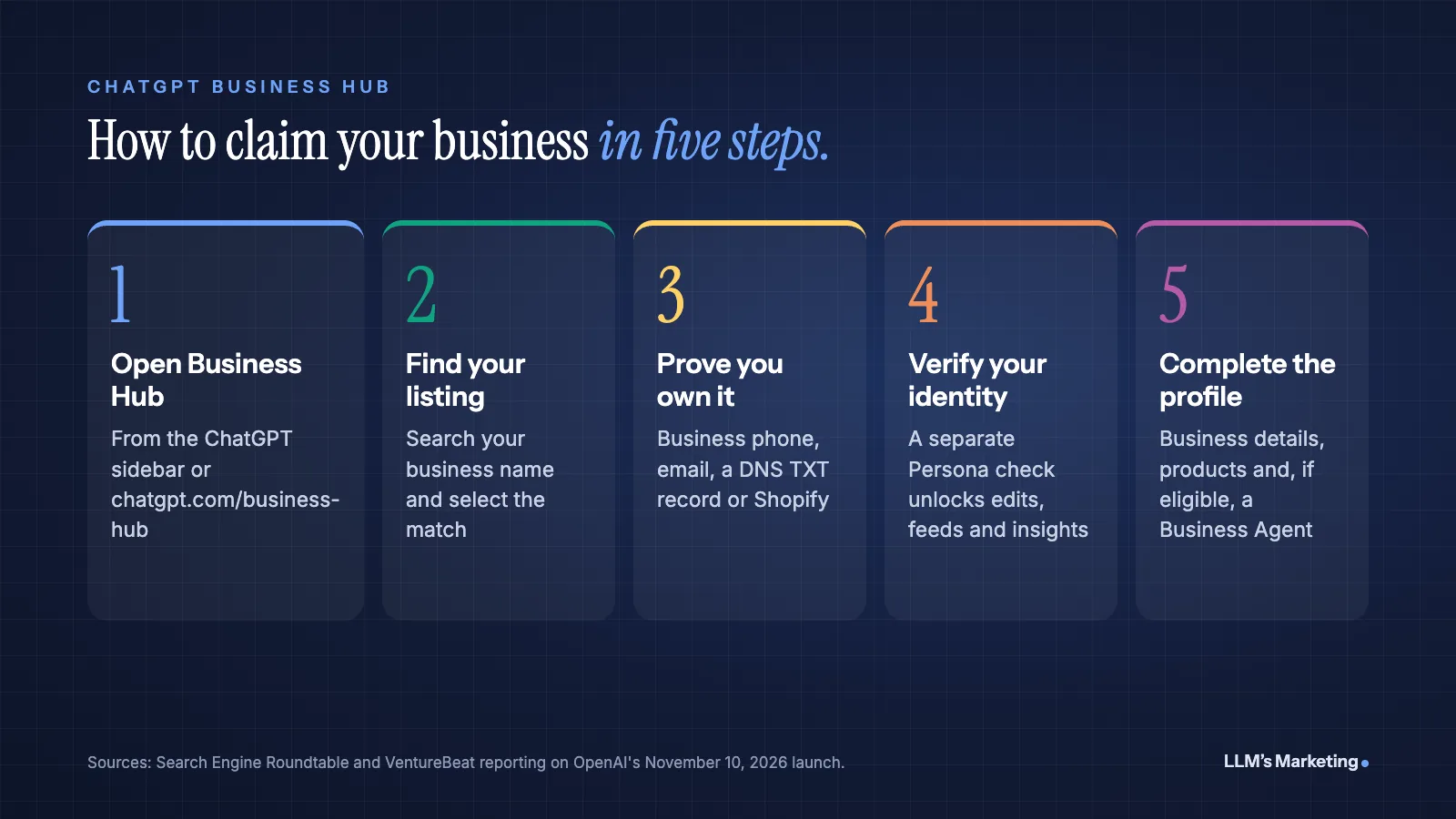
1. Open Business Hub
Sign in to ChatGPT with the account that should manage the business, then open Business Hub from the sidebar or go to chatgpt.com/business-hub. Use an account your company controls, not a freelancer's personal login, because that account becomes the owner of the listing.
2. Find and select your listing
Search for your business by name and select the matching listing. According to OpenAI's help center guide to setting up your business on ChatGPT, if no claim option appears and you see Contact support instead, you can ask OpenAI for help with access from there.
3. Prove you own the business
OpenAI may verify a claim through your business phone number (by text or call), a business email address, your website domain or a Shopify account. For a business with its own website, domain verification is usually the most dependable option, because it does not rely on someone answering a phone at the right moment. It is covered in detail in the next section.
4. Pass the identity check
Ownership of the business and the identity of the person managing it are checked separately. VentureBeat reports that the manager must pass an identity check through Persona before publishing changes, connecting product feeds, viewing analytics or creating an agent. A blue check appears once identity verification is approved.
5. Complete your profile
Once approved, fill in your business details and add your products. Ecommerce businesses can upload a product feed with prices and stock or connect Shopify. If you are an eligible US ecommerce or online service business, you can also set up a Business Agent.
Verifying Your Domain With a DNS TXT Record
If you choose domain verification, ChatGPT gives you a TXT record to add at your DNS provider (GoDaddy, Cloudflare, Namecheap, Squarespace and so on). When we did this for llmsmarketing.com, the record name was openai-business-profile and the value began with openai-business-profile= followed by a unique code. Yours will have its own code, so always copy the exact values ChatGPT shows you.
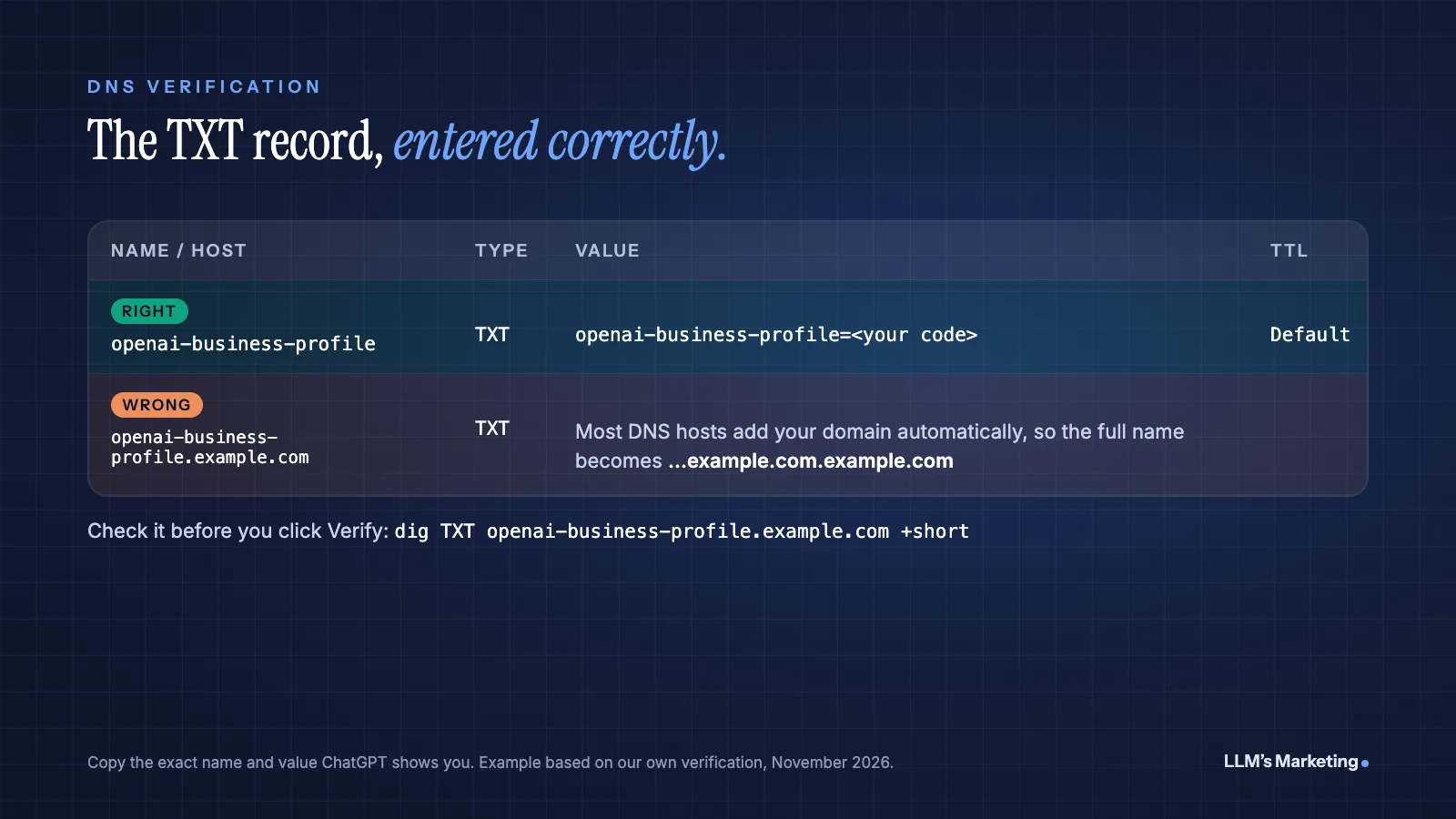
The most common mistake is in the Name (or Host) field. Most DNS dashboards, including GoDaddy's, add your domain to whatever you type there automatically. If you paste the full openai-business-profile.yourdomain.com, the record ends up at openai-business-profile.yourdomain.com.yourdomain.com and verification fails. Enter only openai-business-profile. We made exactly this slip on the first attempt and caught it before saving.
Before you click Verify in ChatGPT, confirm the record is live. On a Mac or Linux terminal, run dig TXT openai-business-profile.yourdomain.com +short. On Windows, run nslookup -type=TXT openai-business-profile.yourdomain.com. Or use any online DNS lookup tool. If you see your openai-business-profile= value, you are ready. If not, wait a few minutes and check again. The verification code we received also came with an expiry time, so add the record promptly after generating it. Leave the record in place after verification succeeds.
Business Agents: What They Are and Who Can Use Them
A Business Agent is an AI assistant that speaks for your business inside ChatGPT, using only the information you supply. OpenAI's example, quoted by Search Engine Roundtable: "someone comparing products could ask about the differences between two options and which features fit their needs. A Business Agent could help them explore those questions using the business's information."
- Eligibility: eligible ecommerce and online service businesses in the US with a website, at launch.
- How customers reach it: from your business profile, they start a separate conversation that ChatGPT labels, so they know they have left the general assistant.
- What you control: the information it uses and the guidelines it follows. Shopify merchants can test answers before publishing.
- Ads: agents can be the destination for a ChatGPT ad, but VentureBeat reports that "Sponsored Agents are in a limited test with selected advertisers." For the wider ad program, see our guide to ChatGPT ads.
- Limit: OpenAI's guide describes one Business Agent per claimed profile.
Treat your agent's knowledge like a sales script. Every return policy, shipping time and product difference it states should match your website exactly, because a customer who gets one answer from the agent and another on your checkout page loses trust in both.
What Claiming Your Business Does Not Do
Claiming your profile is not a ranking shortcut. OpenAI says ChatGPT "will continue to make independent recommendations," and VentureBeat reports that claiming "carries no guarantee of better placement or more sales." What claiming does give you is control over accurate information. OpenAI says it gives businesses "a new way to provide information to ChatGPT, helping people explore products and services using the most accurate and up-to-date details."
Whether ChatGPT mentions you still depends on the same things it did last week: whether ChatGPT's search crawler can reach your site, whether your pages answer real customer questions clearly, and whether other trusted sources talk about you. Our guide on how to get your brand recommended by ChatGPT covers those levers in depth.
One technical check is worth doing now. OpenAI's crawler documentation states that OAI-SearchBot "is used to surface websites in search results in ChatGPT's search features" and that sites opted out of it "will not be shown in ChatGPT search answers, though can still appear as navigational links." If your robots.txt, CDN or firewall blocks OAI-SearchBot, you are limiting the very mentions and clicks Business Hub measures. GPTBot is separate: it relates to model training, and blocking it does not remove you from ChatGPT search.
Reading Business Hub Data Alongside GA4
Business Hub clicks and Google Analytics 4 sessions will not match, and that is expected. A click is recorded in ChatGPT. A session is recorded only if the visitor's browser loads your page and your analytics tag fires, which consent banners, ad blockers and slow pages can all prevent.
To see the GA4 side, look for ChatGPT referrals. OpenAI's publishers and developers FAQ says "ChatGPT automatically includes the UTM parameter utm_source=chatgpt.com in referral URLs." In GA4, filter by session source chatgpt.com to find those visits, then compare the trend, not the exact count, with Business Hub clicks.
| Data source | Best for | Blind spot |
|---|---|---|
| ChatGPT Business Hub | First-party mention and click counts, discovery topics | No prompts, no competitors, no conversions |
| GA4 (source chatgpt.com) | What ChatGPT visitors do on your site, including conversions | Misses visits that block tracking; no view of mentions without clicks |
| Prompt tracking (manual or tools) | Which questions mention you, and how competitors appear | Samples prompts rather than measuring real usage |
| Google Search Console | Google Search, including AI Overviews and AI Mode | AI features are not separated from regular web results |
Used together, these answer different questions. Business Hub tells you whether ChatGPT is showing you more often. Prompt tracking suggests why. GA4 tells you whether it is making money. For the bigger picture across ChatGPT, Perplexity and Gemini, see our guide to AI search visibility.
A 30-Day Plan for Business Hub
Week 1: Claim and secure
- Claim your listing from a company-controlled ChatGPT account and verify by domain if you can.
- Complete the Persona identity check so you can edit details and see insights.
- Write down who owns the account and how to recover it. Search Engine Roundtable's Barry Schwartz said he was "honestly nervous about people hijacking businesses," so check that nobody else has already claimed your listing.
Week 2: Fix what ChatGPT says about you
- Make your name, address, phone, hours, services and policies match your website and Google Business Profile exactly.
- Upload a product feed or connect Shopify if you sell online.
- Check that your robots.txt allows OAI-SearchBot.
- Make sure your Organization and product schema match the same facts (our guide to schema and entity optimization for LLMs explains how).
Week 3: Set your baseline
- Record your first available mentions, clicks and discovery topics. Expect blanks while thresholds build.
- Build a GA4 view or report for source
chatgpt.comwith conversions. - Run the same 20 to 30 customer prompts by hand and note which competitors appear.
Week 4: Turn discovery topics into content
- Compare discovery topics with your pages. A topic where you are cited but have only a thin page is a priority to strengthen.
- Topics that customers ask about but that never show up in your discovery topics are content gaps.
- If you are eligible, draft and test a Business Agent with your top 10 customer questions before publishing it.
Limitations and Open Questions
Business Hub is a beta, and some things are still unclear. Business Agents are US-only for now. OpenAI has not said whether claiming will stay free. The data is aggregated and thresholded, so small businesses may see little for a while. And because mentions for online businesses require a website reference, brands that are discussed often but rarely linked may look less visible than they are.
None of that is a reason to wait. Claiming costs nothing, it protects your listing from someone else claiming it, and it gives you the only first-party ChatGPT data available today. Just do not mistake the dashboard for a strategy. The numbers move because of the work you do on your site and your reputation, not because you claimed a profile.
Frequently Asked Questions
What is ChatGPT Business Hub?
ChatGPT Business Hub is a free, beta tool from OpenAI, launched on November 10, 2026, as part of Businesses in ChatGPT. Verified businesses can manage their information and products, see mentions, website clicks and discovery topics from ChatGPT over 28 days, and, if eligible, publish a Business Agent.
Is ChatGPT Business Hub free?
Yes, at launch. VentureBeat reports, citing Digiday's briefing with OpenAI's VP of monetization Benji Shomair, that claiming is free but that OpenAI did not rule out charging in the future. You do not need a ChatGPT Enterprise agreement or an ads account.
How do I verify my business in ChatGPT?
After selecting your listing in Business Hub, prove ownership with your business phone number, a business email, a DNS TXT record on your website domain or a Shopify connection. The person managing the listing also passes a separate identity check through Persona before they can edit details or see insights.
Does claiming my business improve how ChatGPT recommends it?
No. OpenAI says ChatGPT "will continue to make independent recommendations," and claiming carries no guarantee of better placement. Claiming helps ChatGPT use accurate, up-to-date information about your business, which matters, but visibility still depends on your website, content and reputation.
What counts as a mention in Business Hub?
For online businesses, a mention counts only when ChatGPT references your website in an answer. For local businesses, a mention counts when your location appears in a result. Your brand name alone, without a website reference, does not count as a mention for an online business.
Why don't Business Hub clicks match my Google Analytics traffic?
Business Hub counts recorded clicks on links to your website inside ChatGPT, and OpenAI notes that clicks do not confirm visits or conversions. GA4 records a session only when your page loads and the analytics tag fires, which consent banners, ad blockers and slow pages can prevent. Compare trends rather than exact numbers.
Who can create a Business Agent in ChatGPT?
At launch, Business Agents are available to eligible ecommerce and online service businesses in the US that have a website. The business supplies the information and guidelines, and customers open the agent in a separate, labeled conversation from the business profile.
Where to Start
Claim your listing today, verify by domain, and set a baseline in Business Hub and GA4. Then spend your effort where it moves the numbers: accurate business information, pages that answer real customer questions, and the crawl access ChatGPT's search needs.
If you want help turning Business Hub data into more mentions and clicks, that is what our AI search visibility service does. You can also read our State of AI Search 2026 report for the wider data, or book a free call to talk through your setup.
Is ChatGPT mentioning your business, or your competitors?
Send your website and I'll review how ChatGPT and Google describe your business, check your crawl access and setup, then reply personally with the first fixes I would make.